Formulate
Twelve guided steps of strategy analysis: PESTEL, Porter, value chain, VRIO, EFAS, IFAS, SWOT, TOWS, SPACE, the IE matrix and QSPM, with AI help on each step.

Inspiring Growth!
STRAP brings the whole strategic plan into one program: the analysis, the strategies, objectives and KPIs, the projects, the control plan and the board report. Everyone sees the same scores, every day.
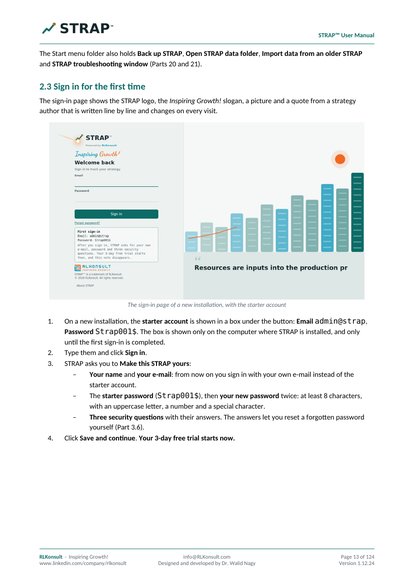
Free for 3 days · no card, no sign-up · sign in with admin@strap / Strap001$
See it in action
Click any page in STRAP's menu to see it, or let it walk you through the whole app.
DashboardEvery score of your plan, on one page.
One program for the whole strategy cycle
Twelve guided steps of strategy analysis: PESTEL, Porter, value chain, VRIO, EFAS, IFAS, SWOT, TOWS, SPACE, the IE matrix and QSPM, with AI help on each step.
Strategies, the strategy map, SMART objectives, KPIs with targets, quarterly OKRs and projects, cascaded to every department.
Scores roll up from each KPI to objectives, strategies and the whole plan, with clear colours and a live dashboard by cycle.
A control plan with early warnings and corrective actions, root cause analysis (five whys and fishbone), issues and a risk register.
A board report with your logo, review meetings with an agenda prepared for you, and minutes ready to print.
Roles for everyone, messages and tasks about any item, follow-ups with email and WhatsApp reminders, and a full change history with undo.
Try it in 30 seconds
This is how STRAP scores your plan: each KPI is compared with its target, and the scores roll up to the objective. Drag the sliders to change this quarter's results.
Drag the sliders to change the results
✓The objective is on track.
Learn STRAP
Watch them here or on YouTube, with English subtitles, or download them to watch offline.
32 videos, most of them 1 to 3 minutes, with subtitles.
What STRAP does for your strategy: formulate it, track it and control it. A tour of the menu, the top bar and the pages, and the difference between STRAP and STRAP LT.
Install STRAP on Windows, sign in with the starter account and make STRAP yours. Create your organization or open the demo, and see how the free trial and the licence work.
Switch between organizations and plans, read the scores in the top bar, and use Help, Support, Ask RLKonsult, your account and the appearance settings.
Set up your organization with its logo and profile, add people and give each a role, see what each role can change, and build the org chart of units.
What a STRAP is, how the STRAP Hub lists your plans, and how to create, edit, export or delete a strategic plan.
The twelve steps of a strategic plan, guided one by one: mark each step done, move to the next or skip it for now, then save and continue later.
Enter a plan you already have, step by step, with KPI targets, or import a whole plan from Excel. Every page also exports to Excel.
The five formulation stages, how to update a step and keep the evidence behind every decision, and how to write the vision, mission and values.
The twelve steps of the analysis: choose your tools, analyse the external environment (PESTEL, Porter and more), record the findings and attach reports.
Strengths and weaknesses, the value chain, VRIO, the portfolio and the other internal tools.
Weigh the external factors (EFAS), rate the internal factors (IFAS) and choose the strategic factors (SFAS), with AI help on each step.
The SWOT built from your strategic factors, the gap between now and where you want to be, and the TOWS matrix that turns them into strategic options.
Find your strategic posture with SPACE and the IE matrix, rank the strategies with the QSPM, and turn them into Balanced Scorecard objectives.
The Strategies page: edit a strategy, choose its grand strategy and type, and check how well your strategy mix fits.
The strategy map and the objective tree: add objectives with SMART fields, with AI help to word them.
Add KPIs, enter targets and actual results for each cycle, and lock a period when it is closed.
How a KPI is scored, how scores roll up to objectives, strategies and the whole plan, the operational score, and the colours.
Create quarterly OKRs with key results, follow their progress, and read the pace marker and status.
The org chart with scores: each unit's objectives, KPIs and projects, its sub-units, and how to manage the units.
The operational plan: add projects, update their progress, and see them in the alignment matrix and the Gantt chart.
Anticipate deviations, set early-warning signals and triggers with corrective actions, and see what has been reached now.
Find why a problem happens with the five whys and the fishbone, turn the root cause into action, and check that the fix worked.
Keep the issue log and the risk register with its heat map, linked to the objectives, KPIs and projects they affect.
Start a review meeting with the agenda prepared for you, record decisions and actions, and print the minutes.
Scores and progress by cycle, strategies and objectives, health, the control plan, what is due soon, and stakeholder performance.
What the board report contains, your logo on the cover, choosing the cycle, and printing or saving it as PDF.
Your inbox and tasks: send a message about any item, assign a task, and hold conversations with several people.
Everything to chase, by person, with email and WhatsApp reminders, contacts, and the reminder pop-up.
Analyse any screen with AI, ask follow-up questions, use AI in the analysis steps, and set it up.
Every change in plain words, before and after: undo it, restore it, or bring a deleted item back.
The licence and moving it to a new computer, automatic updates and backups, running on Windows or a server, support and news.
STRAP LT, the edition for one person: what is the same, what is different, follow-ups instead of messages, and moving up to STRAP.
No video matches your search.
Download
Install on Windows in a minute. No administrator rights needed. The newest version is always offered here.
The team edition: several people, each with their own sign-in and role.
This version runs locally on your PC. For the cloud version please contact: Info@rlkonsult.com, message us on LinkedIn or visit our website RLKonsult.com
The one-person edition: the same strategy tools for one person on one computer.
Ideal for a manager, a founder or an independent consultant. Moving up to STRAP later takes one backup file.
Download and double-click the setup file. If Windows protects your PC, click More info → Run anyway.
Sign in with admin@strap and Strap001$, then make STRAP yours: your e-mail, password and three security questions.
Explore the complete demo company, or create your own. Your 3-day trial starts now; for a licence, contact us.
System requirements: Windows 10 or 11 (64-bit) · Google Chrome or Microsoft Edge · an internet connection at least once every 24 hours.
User manual
The complete guide to STRAP and STRAP LT: what each page is for, what every button does, what to type in each field, with screenshots, a ten-step quick start and troubleshooting.
Editions
| STRAP LTOne person | STRAPYour team, on your PC or network | STRAP CloudYour team, anywhere | |
|---|---|---|---|
| Users | 1 person | As many as your licence | As many as your licence |
| Runs on | Your Windows PC | Your Windows PC or office server | RLKonsult's secure server, nothing to install |
| Access | This computer | Any browser on your office network | Any browser, anywhere, at your own web address |
| All strategy tools | ✓ | ✓ | ✓ |
| Messages, tasks and roles | Follow-ups by e-mail and WhatsApp | ✓ | ✓ |
| Backups and updates | Automatic daily backups; updates offered | Automatic daily backups; updates offered | Done for you by RLKonsult |
| Free trial | 3 days | 3 days | On request |
| Pricing | For pricing, please contact us. | ||
| Download | Download | Ask about the cloud | |
What's new
The story of STRAP in six chapters. New versions arrive regularly, and STRAP tells you when one is ready.
Every step of strategic analysis, guided: PESTEL, Porter and the industry, the value chain and VRIO, weighed in EFAS, IFAS and SFAS, then SWOT and TOWS, SPACE, the IE matrix and QSPM to choose.
The strategy map, SMART objectives, KPIs with targets and results, OKRs and cascading to every department. Each score is calculated by itself and rolls up to the whole plan.
Deviations flagged early, root cause analysis with the five whys and the fishbone, issues with owners, the risk register and its heat map, and an agenda ready for every review meeting.
Ask AI for a written review on any page, from the dashboard to the board report. You choose the AI engine and who may use it.
On your PC, online, or both, kept in sync. Several organizations in one STRAP, daily backups, users with the right access, and your own logo and colours.
Support tickets and chat with RLKonsult from inside STRAP, a full user manual, and 32 tutorial videos with subtitles.
Questions
Yes. Download STRAP or STRAP LT and sign in with admin@strap and Strap001$. After you choose your own e-mail and password, you have 3 days with up to 3 users, with a complete demo company to explore.
STRAP locks until a licence is activated. Your data is kept safe: everything comes back exactly as it was as soon as you enter your licence key.
The price depends on the edition and the number of users. Please contact us for a quote: we answer within 48 hours.
Yes. Install STRAP on one PC or an office server and your colleagues use it from their own computers through the browser. With the cloud version, everyone works from anywhere at your own web address.
Both have all the strategy tools. STRAP LT is for one person on one computer and uses follow-ups instead of messages. STRAP is for teams, with roles, messages and tasks. Moving from STRAP LT to STRAP takes one backup file.
On the PC versions your data stays on your own computer, with an automatic backup every day (the last 30 are kept) and an optional copy to OneDrive or a USB stick. The cloud version runs on a secure server with HTTPS and daily backups.
Yes. Back up on the old computer, restore on the new one, and ask RLKonsult to move your licence from the Licence page. It keeps the same end date.
STRAP works on your computer, but it needs to reach RLKonsult's server at least once every 24 hours to check the licence and offer updates.
Yes. The program's screens are in English, and you can type your plan, objectives and KPIs in Arabic or any other language.
Yes. RLKonsult helps organizations formulate and execute their strategy and trains their teams. Tell us what you need in the form below.
Talk to us
See STRAP with your own strategy in a live demo, ask for a quote or the cloud version, or just ask a question. We reply within 48 hours.